
Kennisbank
How to Enable Cloudflare on your Domain via cPanel? Print dit artikel
1. Log into your cPanel account.
2. In the Software section, click the Cloudflare.

3. Click on Sign in Here to access your Cloudflare account.

4. Under Domain Overview, You can see two options. CNAME Setup and Full Zone Setup. CNAME Setup does not require you to point your DNS nameservers to Cloudflare, and it is easy for you, but If you choose Full Zone Setup, then you need to change your domain nameservers to Cloudflare DNS.
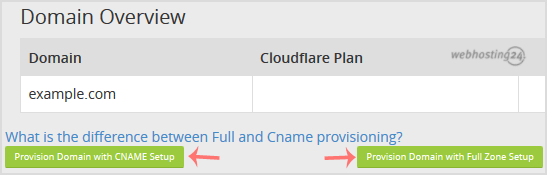
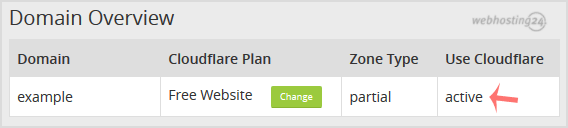
For CNAME Setup: If you choose CNAME Setup, then it will activate to your domain and display status as Active.
For Full Zone Setup: If you choose Full Zone Setup, then it will display nameservers, which you need to set on your domain name.
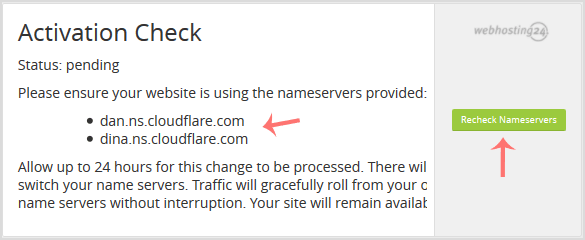
After updating your domain nameserver, Wait for a few hours, log in again to your Cloudflare account, and click on Recheck Nameservers.
Was dit antwoord nuttig?
Gerelateerde artikelen
You can access and manage Cloudflare in cPanel. Follow this tutorial to learn how you can...
You can check the status of your Cloudflare from your cPanel. 1. Log into your cPanel...
Did you ever notice that if your server goes offline, but Cloudflare keep serving your...
1. Log into your cPanel account. 2. In the Software section, click the Cloudflare....
You can increase or decrease the Cloudflare security level from cPanel. Cloudflare has...
