
知識ベース
How to change the language of the Plesk Panel? この記事を印刷
Follow these steps to change the language of your Plesk Panel.
1. Log in to your Plesk account. (e.g., https://example.com:8443 )
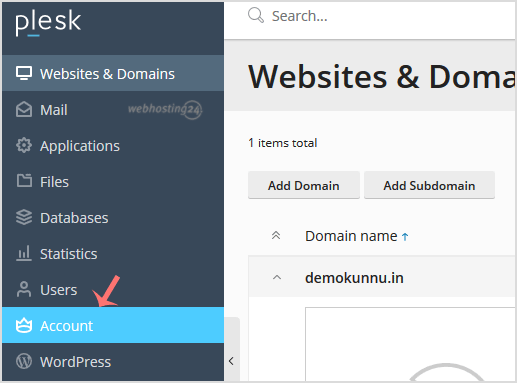
2. In the Sidebar Menu, click on Account.
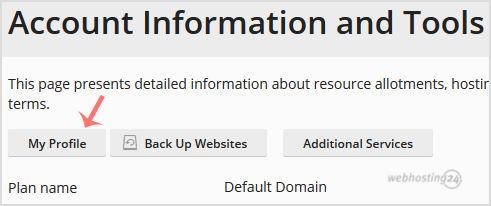
3. Under Account Information and Tools, click on My Profile.
4. Scroll down to the Plesk language and choose yours from the drop-down menu.

5. Then Please scroll down and click Apply.

You will see a success message, signifying that your Plesk panel language has changed.
この回答は役に立ちましたか?
関連記事
How to edit a file in the Plesk File Manager?
1. Log in to your Plesk account. (e.g., https://example.com:8443) 2. In the Sidebar Menu,...
1. Log in to your Plesk account. (e.g., https://example.com:8443) 2. In the Sidebar Menu,...
How to Login to Plesk?
A tutorial on how to access your Plesk Control Panel, the details on the log-in URL, etc....
A tutorial on how to access your Plesk Control Panel, the details on the log-in URL, etc....
How to Change your Plesk Password?
Follow these steps to change your Plesk account password: 1. Log in to your Plesk account....
Follow these steps to change your Plesk account password: 1. Log in to your Plesk account....
How to Reset Your Plesk Password?
Follow these steps to reset your Plesk account password: 1. Open your Plesk login URL....
Follow these steps to reset your Plesk account password: 1. Open your Plesk login URL....
How to change your Plesk contact email address?
Follow these steps to change your Plesk contact email address: 1. Log in to your Plesk...
Follow these steps to change your Plesk contact email address: 1. Log in to your Plesk...
