
Γνωσιακή Βάση
How to Login to Plesk? Εκτύπωση αυτού του άρθρου
A tutorial on how to access your Plesk Control Panel, the details on the log-in URL, etc.
After successfully placing a payment order, you will receive a welcome email from us containing the log-in details. You will need your log-in information to access your Plesk account.
Permanent URL:
https://$hostname.com:8443 (SSL Protected)
http://$hostname.com:8880 (Non-SSL - Insecure)
Log in using the following IP Address:
https://$ip-here:8443 (SSL Protected – Need Exception)
If your domain propagates, you will be able to access it like that: https://example.com:8443.
If your URL does not open on port:8443, please check your welcome URL. Sometimes, port numbers can differ, and you will need to use that port instead of port:8443.
How to log in to Plesk?
Open your Plesk Log-in URL, and once Plesk opens in your browser, it will ask for your username/password.
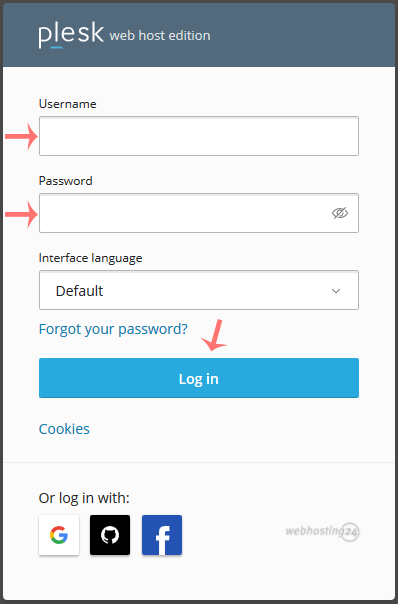
Enter your username and password, and click on Log in. If your login details are correct, you will have successfully logged into your Plesk account.
Ήταν χρήσιμη αυτήν την απάντηση;
Σχετικά Άρθρα
1. Log in to your Plesk account. (e.g., https://example.com:8443) 2. In the Sidebar Menu,...
Follow these steps to change your Plesk account password: 1. Log in to your Plesk account....
Follow these steps to reset your Plesk account password: 1. Open your Plesk login URL....
Follow these steps to change your Plesk contact email address: 1. Log in to your Plesk...
Follow these steps to change the language of your Plesk Panel. 1. Log in to your Plesk...
